

Cwinz APK India 2026
Cwinz APK gives Indian Android users a direct mobile route into the casino, sportsbook, promotions, cashier and support areas. The app route is useful for players who prefer quick login, cricket betting, live casino sessions and faster access to INR payment checks. This guide explains the APK flow with practical installation, security, account and payment details.
The Cwinz India mobile data describes an Android app installed through an APK file from the website, with a published APK size of 127 MB. The mobile setup gives access to casino games, betting sections, bonus notifications, cashier tools and INR currency support. iPhone users can use the mobile web route and save the web version as a home-screen icon, while Android users should keep the APK route strictly official.
| APK detail | Cwinz India data | Practical check |
|---|---|---|
| App type | Android APK | Use official download route |
| File size | 127 MB | Keep extra storage for install/update |
| Access | Casino, sportsbook, promotions, cashier | Log in and test each section |
| Currency | INR support | Check balance and cashier |
| Bonus tools | Bonus notifications and promo access | Verify wagering and expiry |
| Payments | Integrated cashier | Confirm method, limit and KYC |
| iPhone route | Mobile web with home-screen icon | Use browser login |
| Security | Manual install through phone settings | Control permissions |
| Last checked | 31 May 2026 | Recheck active app route |
What the Cwinz APK does for Indian players
The APK turns Cwinz into a mobile-first account hub. Instead of opening the browser every time, Android players can reach slots, live casino, Aviator-style games, cricket betting, cashback offers and cashier history from one app icon.
That convenience matters during live betting and mobile casino sessions, where timing, connection quality and quick account access affect the experience. It also creates a responsibility: the phone should be personal, protected and free from untrusted APK files.
How to install the Cwinz APK
- Open Cwinz on an Android phone
Use the official Cwinz website route from the Android browser. Check the page address and secure connection before downloading the APK.
- Go to the Android app section
Find the mobile or APK section and confirm that the file is connected to Cwinz. The published India app file size is 127 MB, so make sure the phone has enough free storage.
- Download the APK file
Download the file directly from the official route. Do not install files from random messages, cloned pages or social media links because an APK can access login and payment-related data.
- Allow installation in phone settings
Android may ask permission to install from the browser. Enable it only for this installation, then return to settings and switch it off if you do not need it anymore.
- Open the app and log in
Use the same email and password created during registration. After login, check casino, sportsbook, bonus area, cashier, transaction history and support.
- Verify payments before playing
Open the cashier and confirm INR, deposit minimum, withdrawal route and KYC status. The public Cwinz India data shows a ₹500 minimum deposit and ₹1,000 minimum withdrawal, but the live cashier remains the final check.
New players should complete Cwinz registration first, then use the same email and password to log in through the APK.
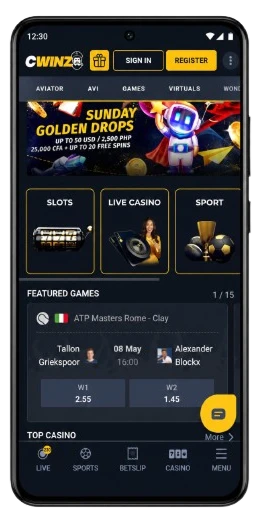
APK features for casino and sportsbook
The Cwinz APK gives full access to casino and betting sections. Casino players can use slots, table games, live dealer formats and crash-style games. Sports players can move into cricket, football, tennis and live betting markets from the same account.
For India, cricket betting and Aviator-style games are often the high-frequency mobile use cases. The practical rule is simple: check stake, odds, market status, game rules and connection quality before confirming an action. A small screen makes fast decisions easier, but also makes missed terms more likely.
APK, bonuses and cashier access
Cwinz mobile access includes promotion and cashier areas. This is useful when checking a welcome offer, cashback campaign or free bet while away from desktop. The welcome package publicly mentions 150% on the first deposit plus 20 free spins, and the bonus area should show whether the offer is active for the account.
The cashier matters even more. Payment methods, limits, transaction status and KYC messages can differ by account. If a payment stays pending, keep transaction IDs, bank confirmations or crypto hashes before contacting support. Mobile transactions should be checked against the Cwinz payment methods guide for INR limits, KYC status and withdrawal routes.
Before activating offers from mobile, review the Cwinz bonus guide to understand wagering, free spins, cashback and eligible games.
APK safety checklist
Mobile security is part of real-money account safety. The APK stores session access, and the account can include payment history, betting history and verification documents.
Use a clean setup:
- download only through the official route;
- avoid APK files sent in chats;
- keep the phone locked with PIN or biometric access;
- do not save login on a shared device;
- review permissions during installation;
- update only from the trusted Cwinz route;
- send KYC documents only through account or official support.
Troubleshooting
| Issue | Likely reason | What to do | Where to verify |
|---|---|---|---|
| APK does not download | Browser, network or storage issue | Retry on stable connection and free space | Android browser |
| APK does not install | Permission is blocked | Enable install permission for the browser | Phone settings |
| App opens but login fails | Wrong email, password or unconfirmed account | Reset password or confirm email | Login page |
| Cashier does not show expected method | Account route or payment review | Check other visible methods and support | Cashier |
| Bonus area looks different from desktop | Campaign or account status differs | Compare promotion status | Bonus section |
| Live casino lags | Weak connection or low device memory | Close background apps and use stable data | Device settings |
| Withdrawal request stays pending | KYC, wagering or payment route check | Complete verification and review transactions | Account area |
Responsible gaming
The Cwinz APK makes access faster, which is useful but can also increase unplanned sessions. Set deposit and time limits before using the app for casino or betting. If the app becomes a habit rather than a planned activity, log out, pause or use support tools.
FAQ
The Cwinz APK is the Android app route for Indian players. It gives mobile access to casino games, sportsbook, promotions, cashier, support and INR account functions through a manually installed app file.
The Cwinz India mobile page mentions a 127 MB APK file. Keep extra storage available because Android may need additional space during installation and future updates.
Open the official Cwinz route on Android, download the APK from the mobile section, allow installation in settings, install the file and then log in. After installation, review permissions and keep the app on a personal phone.
Yes, iPhone users can use the mobile web route and save the web version as a home-screen icon. The account, cashier, bonus and support areas should still be checked through the browser before payment actions.
The APK includes cashier access, so deposits and withdrawal requests can be managed from mobile when the account allows it. Before payment, check INR, method limits, KYC status, bonus status and transaction history.
Android asks for permission because the APK is installed manually through the browser. Enable permission only for the official file, complete the installation, then switch the permission off if it is no longer needed.
Yes, use the same email and password created during registration. Your casino balance, sportsbook bets, bonus status, cashier history and support conversations stay connected to the account.